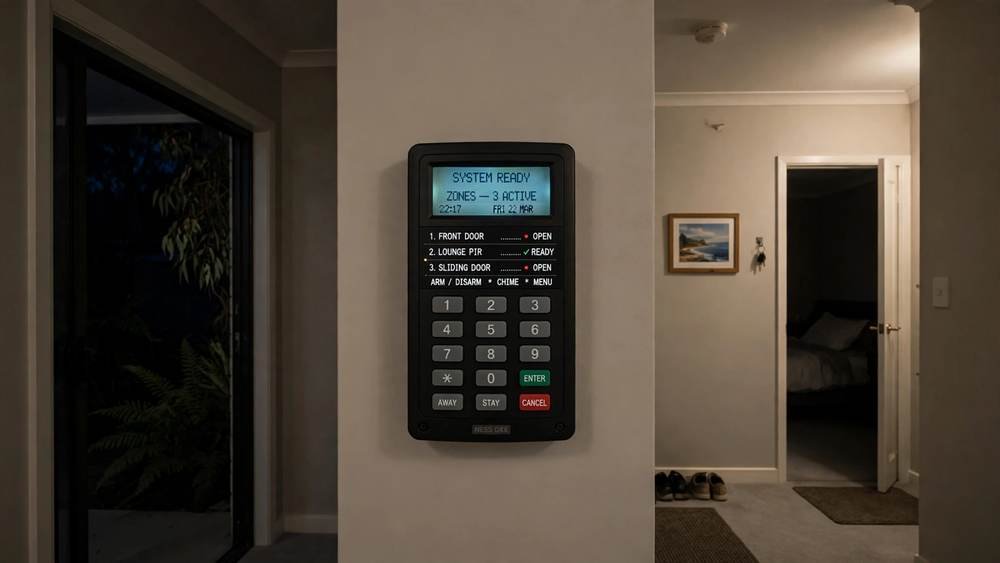
Alarm zones explained in plain English: a zone is one labelled input on your alarm panel, and every sensor wired or paired to that input reports under that one name. When the keypad says “Zone 4 — Living Room PIR”, it is not describing a room. It is describing a circuit the panel watches. If that circuit opens, the panel knows exactly where to look — a zone tells you where, not just that something happened.
Figures checked on 26 November 2026. Our best home alarm system guide compares the panels behind these numbers, and our wired alarm system guide covers when a wired panel still wins.
Alarm zones explained: what a zone actually is
Think of a zone as a named watch post: one input on the control panel, fed by one or more sensors. A door contact might be Zone 1, the living-room motion sensor Zone 2. The panel monitors every zone separately, armed or not, and logs each change against that zone name.
The detail most people miss is that a zone is not a sensor. One zone can hold several sensors. Three windows in one bedroom can share a single zone, and the panel will treat them as one input. If any one of the three opens, the panel reports the bedroom zone, not the specific window. That is cheaper to wire, but it costs precision: to know which window opened, each window needs its own zone.
Zones also carry a type, not just a name. An entry zone gives you a delay: open the front door, and the panel waits — usually 30 seconds — for you to disarm before sounding. An instant zone gives no delay: a back window at 2 am should trigger immediately. A 24-hour zone is always active, armed or not, and is used for smoke detectors, panic buttons and tamper switches. Getting the type wrong is worse than getting the count wrong: a front door set as instant fires the siren every time you come home, while a back window set as entry gives an intruder a free 30 seconds.
How many zones does a typical Australian home need?
There is no standard number, because homes differ, but there is a reliable way to count. Walk your house and list every opening an intruder could use: every external door, every ground-floor window, every sliding door, and the garage-to-house door if you have one. Then add the internal detection: one motion sensor per main living area, and one in the hallway that connects the bedrooms. That list is your zone count if every opening gets its own zone.
For a typical three-bedroom single-storey home, that count usually lands between eight and twelve: four doors, four or five ground-floor windows, and two motion sensors. That is why the eight-zone panel is the entry point and the sixteen-zone panel the comfortable fit — eight cover a small home or flat, sixteen cover most family homes with room to spare. This is the counting step most guides skip, and it is the most practical part of alarm zones explained for a real house.
Two-storey homes need more, because the stairwell and upper hallway need their own detection. A granny flat, a shed with tools, or a pool gate each add zones too — count those before choosing a panel, because adding zones later means new wiring or a panel upgrade. Grouping is the legitimate way to fit a smaller panel: bedrooms on the same side can share a zone if you accept the panel will only say “bedrooms”, never “spare bedroom window”. Zone the front door, back door and master bedroom separately, group the rest if you must, and write the grouping down.
Alarm zones explained through the Bosch and Ness panels
The two panel families most Australian installers fit make the zone question concrete. The Bosch Solution 2000 provides eight fully programmable zones for hard-wired detectors — suited to a smaller home or straightforward retrofit. The Solution 3000 offers sixteen zones, wired or wireless, and is the usual pick for a family home. The Solution 6000 starts at sixteen and expands to 144, with access control built in — the right choice for a large home or small business. All three split into two areas, so one panel can act as two systems: house armed while the shed stays off, or vice versa.
Ness, the Australian maker, follows the same pattern. The Ness D8x is an eight-zone panel and the D16x is a sixteen-zone panel, both with two-area partitioning and support for up to three keypads. The newer D8XCEL and D16XCEL add a 4G communicator on board. The pattern matters more than the brand: eight is the starting point, sixteen the family-home standard, and anything above that is for large or unusual properties.
Price follows the same ladder. Our best home alarm system guide, with prices checked in November 2026, lists a Solution 2000 from about $1,020 fully installed in a Sydney listing, a Solution 3000 kit from about $1,534 in one listed configuration, and a Solution 6000 at about $1,966 in one installed-plus-monitoring deal. Those are guide figures, not quotes for your house — zone count, wiring and monitoring move the real price — but the shape is clear: eight to sixteen zones costs a few hundred dollars more, while a 144-zone panel is a different class of system. One practical note: the Bosch 2000 delivers its eight zones through four physical terminals using zone doubling, so if a quote says eight zones, ask whether all eight are separately wired and labelled.
Zoning a house sensibly: a room-by-room plan
Start at the front door: Zone 1 on most installs, set as an entry zone with a delay. The back and laundry doors follow — entry zones if you use them to come and go, instant if not. The garage-to-house door deserves its own zone and instant type: nobody should get thirty seconds of grace there.
Ground-floor windows come next. Living-area windows — facing the street or hidden behind a fence — deserve individual zones, because those are the windows an intruder tests first. Bedroom windows can share a zone per room if the budget demands it. Sliding doors get their own zone each: the easiest entry point in most Australian homes, and the doors most often left unlocked.
Motion sensors are the second layer: one per open-plan living area, placed in a corner that sees the whole room, and one in the hallway that links the bedrooms. A sensor where a pet roams needs a pet-friendly model, with an immunity rating matched to the animal’s weight, or the dog will set the alarm off at 3 am. Do not zone a motion sensor with a door contact — when the sensor trips you want to know it was movement, and when the door opens you want to know it was the door. A shed with tools is worth a zone of its own, and a granny flat should be its own area, so it can be armed and disarmed independently.
Stay mode, home mode and bypassing zones
Zones only earn their keep if the system is used every night, and that is what Stay mode is for: it arms the perimeter — doors and windows — while leaving internal motion sensors off, so you can move around while protected. Home mode on a Ness panel is the same feature under another name. A system that can only be fully armed or fully off gets left off.
Bypassing is the companion feature, and the one most often misunderstood: it tells the panel to ignore a zone for one arming period — the bedroom window left open on a hot night, for example. The bypass ends when you disarm, so it must be set again the next night; that is a safety feature, not a flaw. Bypass deliberately, one night at a time, and never bypass the front door or back door. Day mode and chime mode are the daytime versions of the same idea: a chiming zone sounds a short tone at the keypad when it opens, even disarmed — useful for the front door when children are home, and for the pool gate at any hour.
Common zoning mistakes
The most common mistake is zoning by sensor instead of by risk: every opening gets a zone, the panel fills up, and the high-risk openings — front door, sliding door, master bedroom — end up grouped with three others because the count ran out. Zone the high-risk openings first, group only what is low-risk and hard to reach. The second mistake is the opposite: too few zones, with everything grouped into two or three. A panel reporting “Zone 2 — Downstairs” tells you nothing useful at 2 am, and the monitoring centre even less.
The third mistake is naming. Zones left as “Zone 1” through “Zone 8” are useless in a real alarm event — the installer meant to come back and label them, and never did. Every zone should carry a plain name on the keypad and the panel’s printed zone list: “Front Door”, “Lounge PIR”, “Sliding Door”. Check the names on handover. The fourth mistake is forgetting the tamper: every sensor has a tamper switch on its own 24-hour zone, and if it is not programmed, an intruder can peel a sensor off and the panel will never know.
When to add zones — and when not to
Add zones when the house changes: a renovation, a new sliding door, a granny flat, or a shed that starts holding expensive tools. Add them when a zone keeps false-alarming because of grouping — splitting one grouped zone into two often ends a run of false alarms no sensitivity adjustment will fix — and when the monitoring centre keeps calling about a zone you cannot identify.
Do not add zones for their own sake. A sixteen-zone panel with six zones used is headroom, not waste — it lets the system grow with the house. But a sensor on every window of a two-storey home is money spent on information nobody will act on. The test sums up alarm zones explained in one line: when this zone triggers at 2 am, will I know what to do differently because I know which zone it was? If no, group it. If yes, give it its own zone. Our monitored alarm system guide explains who actually needs 24/7 response once the zones are in place, and our wireless alarm system guide compares the kits behind these paths. For the panel figures themselves, the CTC Communications Bosch Solution range lists the 2000 at eight zones, the 3000 at sixteen, and the 6000 expandable to 144.
How many alarm zones does a house need?
Most three-bedroom single-storey homes need eight to twelve zones if every opening is zoned separately: four doors, four or five ground-floor windows, and two motion sensors. An eight-zone panel covers a small home; a sixteen-zone panel covers most family homes with room to spare.
What is the difference between a zone and an area?
A zone is one input the panel watches, such as a single door or sensor group. An area, also called a partition, is a group of zones that can be armed and disarmed independently — the house as one area and a granny flat as another, for example. Bosch 2000, 3000 and 6000 panels and Ness D8x and D16x panels all support two areas.
Can one alarm zone cover several windows?
Yes. Several windows in one room can share a zone, and the panel will report the zone name, not the specific window. That saves zones and wiring, but it costs precision: when the zone triggers you will know the room, not the window. Zone the front door, back door and sliding doors separately.
What is Stay mode on an alarm system?
Stay mode arms the perimeter zones — doors and windows — while leaving internal motion sensors off, so you can move around the house while it is protected. Ness panels call the same feature Home mode. A system that can only be fully armed or fully off tends to be left off at night.
Do I need a 16-zone panel or is 8 enough?
Eight zones suit a small home or flat with few openings. Sixteen zones suit most family homes, and the price step is modest — a Bosch Solution 2000 from about $1,020 installed versus a Solution 3000 kit from about $1,534 in listed November 2026 configurations. Choose sixteen if you have a two-storey home, a shed, or a granny flat, or if you want headroom for later.